Available on working days between 9:00 am to 6:00 pm
Email us: sales2@industriaxplc.com
Available 24/7 for inquiries and support
Description
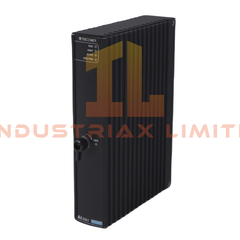
Yokogawa VF701 Vnet/IP Interface Card
The Yokogawa VF701, also cataloged as the VF701 Vnet/IP Interface Card, operates as a dedicated hardware component for high-speed deterministic communication within CENTUM VP and CENTUM CS 3000 distributed control networks.
Hardware Specifications
Parameter
Specification
ModelBrand
Yokogawa VF701
Origin
Japan
Weight
0.45 kg (typical PCIe card)
Dimensions
Standard low-profile or full-height PCIe form factor
OperatingTemp
0 to 55 degC (ambient)
PowerConsumption
12 W typical
CPU Requirement
Core2 Duo 2.13 GHz minimum, Xeon dual-core 2.0 GHz minimum
Main Memory
6 GB minimum
Hard Disk
20 GB free space minimum
Display
SXGA 1280x1024, True Color 16.77 million colors minimum
Expansion Slot
1 PCIe slot (for control network interface)
Optical Drive
DVD-ROM
Process Control Network Features
4-20 mA HART Loop Protocol: Supports interfacing with analog control loops, maintaining signal integrity and accurate process value transmission.
Channel-to-Channel Isolation: Electrical isolation between network channels to prevent ground loops and minimize interference.
Q: Does the VF701 support hot-swap in a live PCIe slot? A: No. The VF701 must be installed or removed with the system powered down to maintain bus integrity and avoid data loss.
Q: What is the network failover behavior? A: Upon loss of communication on Bus 1 or Bus 2, the VF701 automatically switches to the redundant path without interrupting Vnet/IP packet flow.
Q: Are firmware updates compatible across CENTUM VP and CS 3000? A: Yes. The card firmware is backward-compatible with both CENTUM VP and CS 3000 HIS/ENG workstations.
Field Installation Guidelines
Install the VF701 into a properly grounded PCIe slot, ensuring the card is fully seated in the connector.
Use Cat5e or higher twisted-pair copper cabling for RJ-45 ports; maintain cable runs under 100 meters per segment.
Route network cables to avoid high-current or noisy power lines to reduce EMI.
Verify dual-port redundancy configuration when connecting to dual network switches.
Ensure chassis grounding continuity to avoid signal integrity degradation.
Observe standard ESD precautions when handling the PCIe card.